
Run the whole institute from one screen
Admissions, fees, staff, hostel, mess, transport, library, store, accounts and reports in one secure system, for a single school or a trust with many schools and colleges.
Built for institutes that are growing
More students, more campuses and more staff mean more paperwork. The Administrative ERP gives every office one standard way of working, so management gets accountability and transparency without chasing people for reports.
Start with fees and admissions in a week. Add hostel, transport, payroll or library whenever you are ready.
A student admitted at the front office appears in fees, attendance, exams, transport and the parent app on the same day.
When daily work runs itself, management can spend its time on results, admissions and growth.
39 modules across the whole institute
Grouped the way your institute works. Choose a group to see its modules.
From the first enquiry to the alumni list
Capture enquiries from calls, website and walk-ins; run admission campaigns.
Registration and entrance tests before admission.
Admission form, documents and first fee in one flow.
One complete profile: personal and family details, documents and history.
Courses, streams, divisions, subjects and eligibility rules.
Year-wise registration, subject choice and promotion.
Class and teacher timetables without clashes, with substitutions.
Daily or subject-wise smart attendance with parent alerts.
Exam schedules, mark entry, grading, results and report cards.
Leaving, bonafide, character and custom certificates in your format.
Government and trust scholarships, sponsors and their tracking.
Attendance, results, fees, notices and homework on the phone.
Passed-out students, their contacts and alumni events.
From recruitment to retirement
Complete service book: joining, qualifications, documents and history.
Vacancies, applications, interviews and appointment letters.
Salary structures, allowances, deductions and payslips.
Leave types, approvals, balances and daily staff attendance.
Attendance, marks, homework and messages from the teacher's phone.
Everything that keeps the campus running
Trusts, institutes, campuses, departments and academic years.
Fee structures, instalments, concessions, fines, receipts and online payment.
Rooms, beds, allotment, hostel fees, visitors and leave passes.
Menus, mess registrations, consumption and mess bills.
Routes, stops, vehicles, drivers, transport fees and pickup lists.
Catalogue, issue and return, fines and stock checks.
Purchase, stock, issue to departments and reorder levels.
Complaints, repair jobs, assets and service schedules.
Halls, labs, grounds and vehicles booked without clashes.
Department budgets, approvals and spend against budget.
Internal audit trail of every financial entry and change.
Fee and expense entries flow to Tally and other accounting software.
SMS, email and app notifications from every module.
Letters and documents received and sent, with tracking.
Parent, student and staff surveys with results.
Works with our Academic ERP and LMS: one record for both.
What management sees
Graphical dashboards for every level, with Excel download of every report.
Fee collection, admissions, attendance and results trends for the director.
One combined view of every school and college of the trust.
Each login sees only what that role should, with secure passwords.
Import tools to move data from old software, plus regular backups.
What the office and management see
Real screens with demo school data.
One system for the whole office
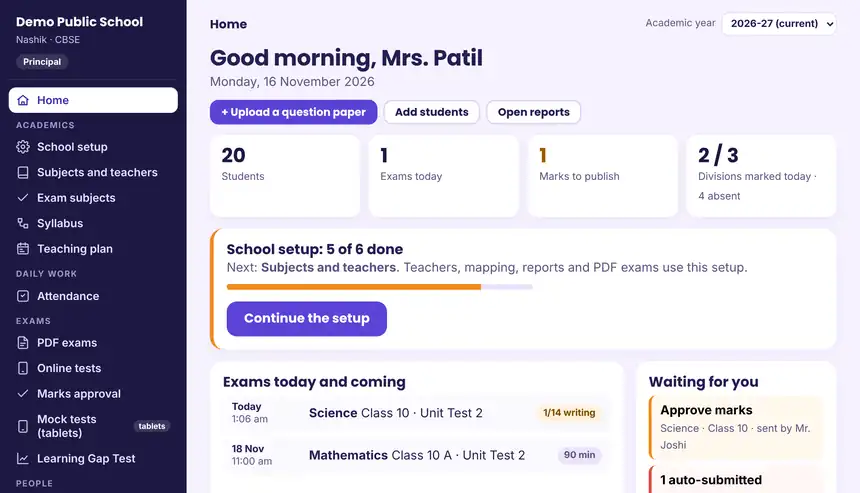
The management system for schools, colleges and multi-institute educational trusts. The principal sees the whole institute on one home screen.
- Enquiry, pre-admission and admission
- Fee structures, receipts and concessions
- Staff records, HR and payroll
- Transport, hostel and mess
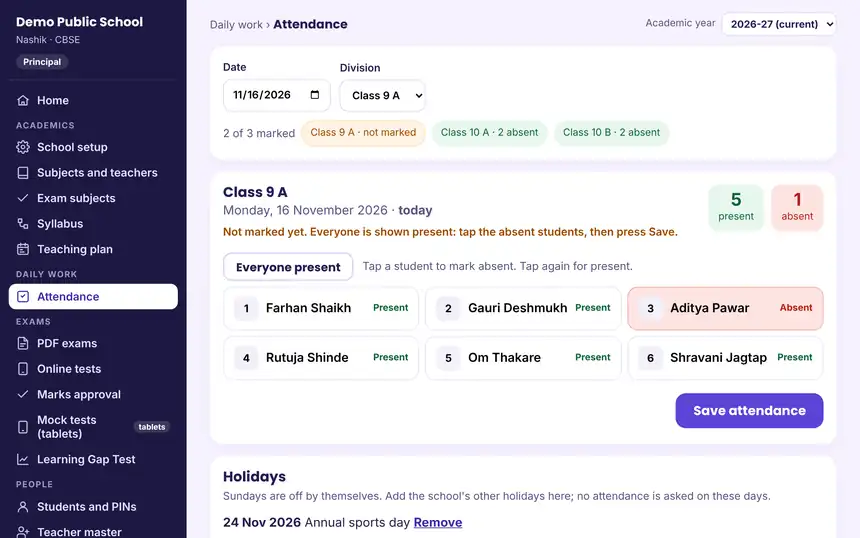
- Tap-to-mark attendance with monthly reports
- Certificates and documents
- Role-based logins from trustee to clerk
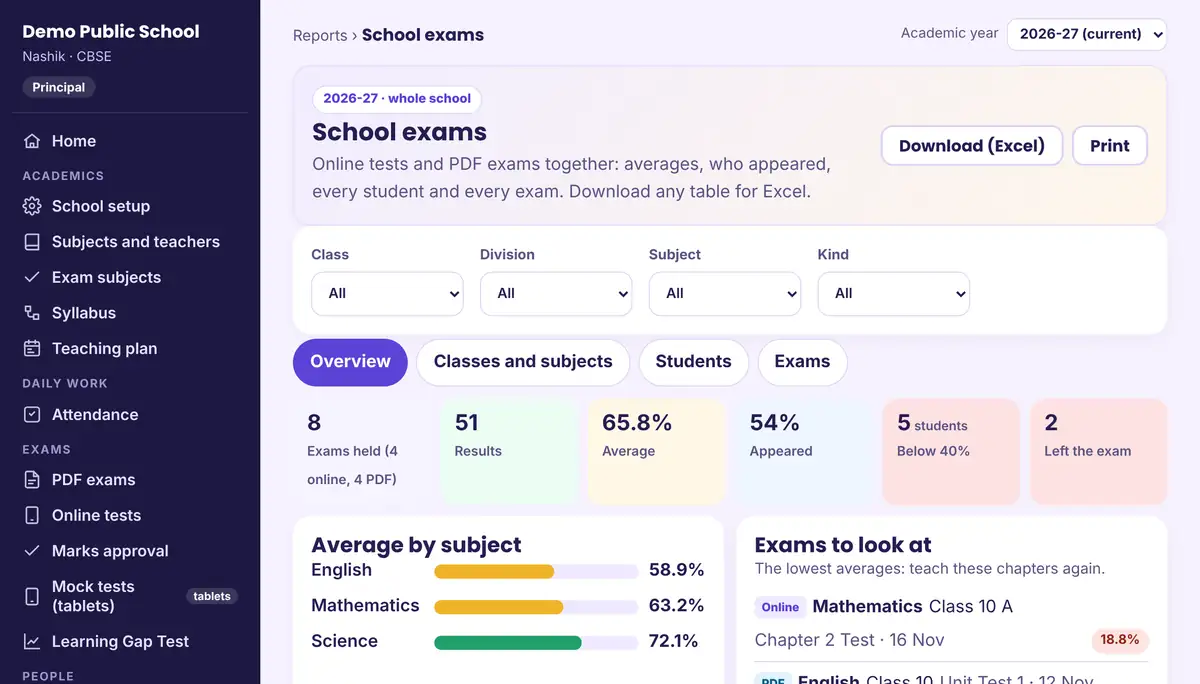
- Reports and MIS with Excel download
Exams today, marks waiting for approval, and how many divisions have marked attendance, all on one screen.
Exams today, marks waiting for approval, and how many divisions have marked attendance, all on one screen. Everyone is shown present; the class teacher taps the absent students and saves. Holidays and the monthly register follow by themselves. Averages by class, subject, student and exam, with the weakest chapters shown first. Every table downloads to Excel.A login for every desk
29 types of login. Each person sees their own work and nothing more, and the president sees everything across the group.
- PresidentControls the whole group of institutions
- Executive presidentControls one institution
- CEO or directorDecision support dashboard
- ManagerDay-to-day management work
- AccountantFees, expenses and accounts
- Internal auditorChecks every entry
- Accounts clerkReceipts and vouchers
- Transport in-charge
- Hostel coordinator
- Rector
- Mess in-charge
- HR manager
- Store manager
- Maintenance manager
- PRO
- Advertisement department
- Inward and outward desk
- OPD
- Academy manager
- Principal
- Supervisor
- Exam coordinator
- Clerk
- School accountant
- School PRO
- Class teacher
- Subject teacher
- ParentAttendance, results, fees and notices
- StudentTimetable, homework, results and tests
Admission CRM and promotion tools
Built in, so the same system that runs the school also helps fill it. Every parent touch point, from the first enquiry to enrolment, sits on one platform.
- Every enquiry captured with its source: website, phone, walk-in, campaign or reference
- Follow-up reminders for counsellors, so no parent waits for a call back
- Over 50 reports by branch, team, counsellor and marketing channel
- Shows which channel brings admissions, so money goes where it works
- Online fee payment by UPI, card and net banking
- Works on the phone, on and off the campus
Promotion tools for the school
Parents and students stay connected
A dedicated parent section in the app keeps families part of the child's school life.
Attendance
Parents see daily attendance and get an alert when the child is absent.
Results and report cards
Marks, grades and report cards as soon as they are published.
Fees
Pending fees, receipts and online payment.
Notices and teacher feedback
Circulars, homework and messages from teachers.
What comes with every installation
Moving from your old software
Demo
We show the ERP for your type of institute, on campus or online.
Setup
Your trust, institutes, classes, fee structures and logins are configured with you.
Data migration
Students, staff and fee records move from your old software or Excel.
Training
Office staff, teachers and principal are trained on their own logins.
Support
Phone, WhatsApp and remote help, plus regular updates.
Questions institutes ask
Do we have to take all the modules?
No. The ERP is modular. Most institutes start with admissions, fees and attendance, and switch on other modules later. Your data carries over.
Can it handle a trust with many schools and colleges?
Yes. Each institute works separately, and the president and head office see a combined view of all of them.
Can we move our data from the old software?
Yes. We have import tools for students, staff and fee records from other software and from Excel.
Does it work with Tally?
Yes. Fee receipts and expenses can be sent to Tally, so the accountant does not enter them twice.
Can you change a report or a certificate to our format?
Yes. Certificates, receipts and reports are set to your institute's format, and custom reports can be added.
Who will train our staff?
Our team trains each user on their own login, on campus, and stays available on phone and WhatsApp after go-live.
See your institute on one screen
Bring your fee structure and class list; we will show them working in the ERP.
Book a free demo
See our AI, tablets and ERP working with your own classes. Fill the form and our team calls you back to fix a time.
- At your campus or onlineWe come to you, or show everything on a video call.
- Call back the same working dayRequests after 6 pm are answered the next morning.
- No cost, no obligationA quote is shared only when you ask for it.